The Cylex business directory is one of the largest local search platforms in the world. It has been running since 1997, operates across 32 countries, and has generated over 196 million pageviews across its network.
If your business is not listed there, you are missing a citation source that local SEO depends on.
In this blog, we are going to cover everything you need to know about Cylex: what it is, how it works, and how to get your business visible on it fast.
Here is what you will find inside:
- What the Cylex business directory is and how it works
- Why listing your business there helps local SEO
- The difference between a free and premium listing
- How to add a new listing or claim an existing one
- How to optimize your profile for better visibility
- What mistakes to avoid
What Is the Cylex Business Directory?
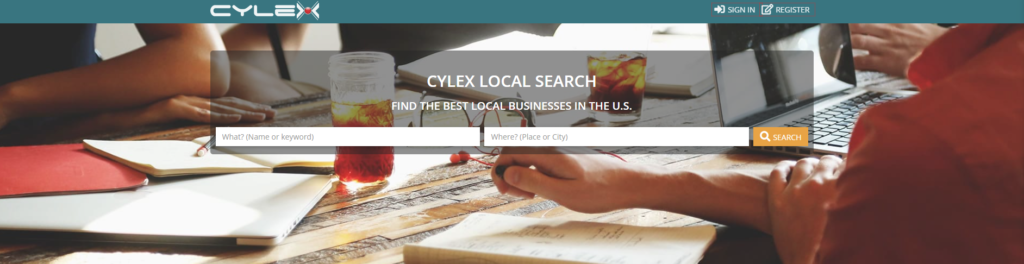
Cylex is an online local search platform that connects businesses with nearby customers.
It launched in 1997 and has grown into one of the largest business directory networks in the world. Today it operates in 32 countries, integrates with 91 other directories, and has recorded over 196 million pageviews across its network.
Cylex is not a blog. It is not a social media platform. It is a structured local search directory where people go to find businesses, check contact details, read reviews, and compare options before making a decision.
When someone searches for a service in their area, Cylex surfaces relevant business profiles based on location and category. Your listing acts as a standalone page that shows your business name, address, phone number, hours, description, photos, and customer reviews.
Business owners can list for free or upgrade to a premium entry for more visibility and features. The platform also supports bulk listing uploads and syncs data across partner directories, which makes it a useful tool for agencies managing multiple clients.
Why Getting Listed on Cylex Still Matters for Local SEO
Local SEO works on trust signals. Google wants to confirm that your business is real, that your information is accurate, and that other reliable sources agree with what your website says.
That is where citations come in.
A citation is any mention of your business name, address, and phone number online. Every time a trusted directory lists your business with consistent information, it sends a positive signal to Google that your data is accurate and your business is legitimate.
Cylex is one of those trusted sources.
What NAP Consistency Actually Means
NAP stands for Name, Address, and Phone number. These three details need to match exactly across every platform where your business appears: your website, Google Business Profile, Yelp, Cylex, and anywhere else.
Not roughly the same. Exactly the same.
If your address shows “St.” on one platform and “Street” on another, or your phone number is missing an area code on one listing, Google picks up on those inconsistencies. It reduces confidence in your data, which can pull down your local rankings.
A Cylex listing that matches your other profiles adds one more consistent data point to that picture.
How Directories Feed Into Local Rankings
According to Moz’s Local Search Ranking Factors research, citations and NAP consistency account for a meaningful portion of local search ranking signals. Directories like Cylex contribute to this in two ways.
First, they provide a backlink to your website, which adds to your overall domain authority.
Second, they act as a third-party confirmation of your business information. The more authoritative sources that agree on your NAP data, the more confident Google becomes about surfacing your business in local results.
Cylex also syncs its data across 91 partner directories. That means one accurate listing on Cylex can reinforce your presence across a wide network, not just on the Cylex platform itself.
How Cylex Compares to Other Directories
Cylex is not a replacement for Google Business Profile or Yelp. It works alongside them.
| Directory | Best For | Free Listing | Regions |
| Google Business Profile | All businesses, maps visibility | Yes | Global |
| Yelp | US-based restaurants and services | Yes (basic) | Mostly US |
| Cylex | Local businesses across 32 countries | Yes (full profile) | Global, strong in EU, AU, CA |
Google Business Profile is always the priority. But Cylex fills a gap that Google and Yelp do not cover equally, especially for businesses outside the US or those building citation strength in international markets.
Using all three together gives you better coverage, stronger citation signals, and more chances to appear when a nearby customer is searching.
Free Listing vs. Premium Entry: What Is the Difference?
Cylex offers two listing options. The free listing covers the basics and is enough for most small businesses to get started. The premium entry adds more visibility and features for businesses that want to stand out in category results.
Here is a clear breakdown of what each option includes.
| Feature | Free Listing | Premium Entry |
| Business name, address, phone | Yes | Yes |
| Website link | Yes | Yes |
| Business description | Yes (short) | Yes (extended) |
| Opening hours | Yes | Yes |
| Photos | Limited | More allowed |
| Videos | No | Yes |
| Price lists and brochures | No | Yes |
| Promotions and special offers | No | Yes |
| Priority placement in results | No | Yes |
| Category placement boost | No | Yes |
| Analytics and profile insights | Basic | Detailed |
The free listing gives you a complete, indexable business profile with your core NAP data, a description, and a link back to your website. That is enough to start building citation value for local SEO.
The premium entry is worth considering if you are in a competitive category, want to appear above other listings in search results, or need to showcase more content like photos, videos, and promotional offers.
For most businesses starting out, the free listing is the right first step. Get it fully filled out before deciding if the premium upgrade makes sense for your situation.
How to Add Your Business to the Cylex Directory (Step by Step)
Adding a new listing to Cylex takes around 20 to 30 minutes if you have your business information ready. The steps below are based on the US version at cylex.us.com. The process is nearly identical for other regions including cylex-uk.co.uk, cylex-canada.ca, and cylex-australia.com.
Before you start, have these ready:
- Business name (exactly as it appears on your website)
- Full business address
- Phone number
- Website URL
- Business email address
- A short business description
- Your primary business category
Step 1: Go to the Cylex website
Visit cylex.us.com and click the Register button in the top right corner of the homepage.
Step 2: Create your account
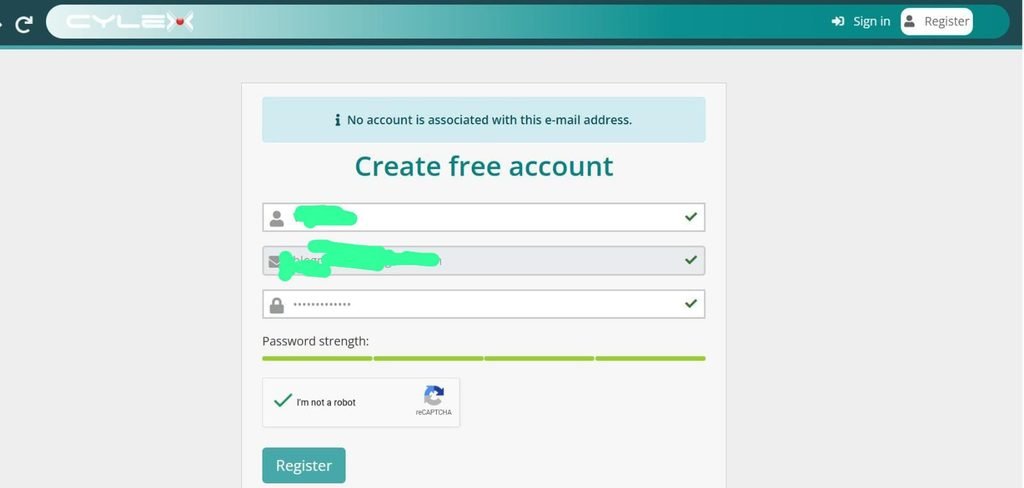
Enter the email address you want to use for your account. Using your business email is recommended as it keeps everything consistent. You can also sign up using a Google or Facebook account. Agree to the terms and conditions before moving forward.
Step 3: Verify your email
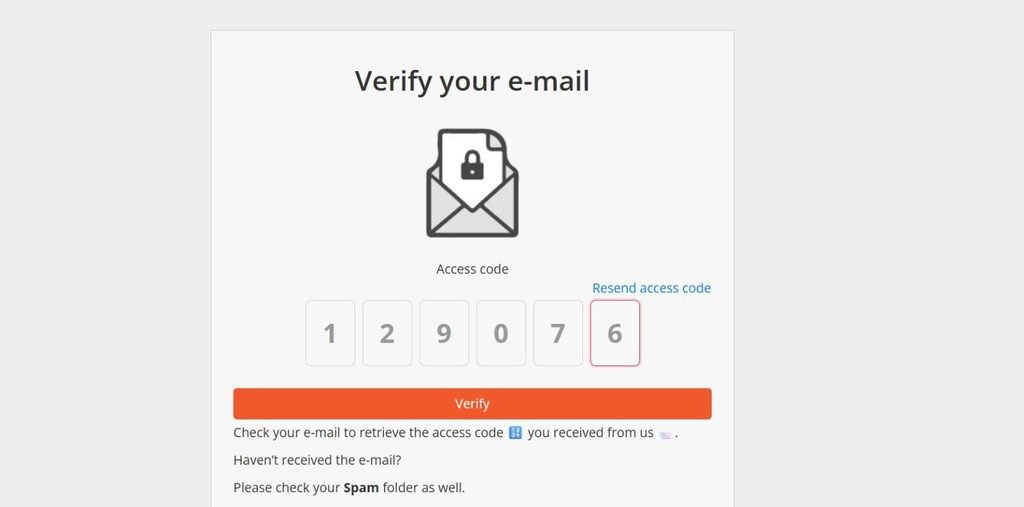
Cylex will send a verification code to the email address you entered. Enter the code on the screen to confirm your account.
Step 4: Add your business
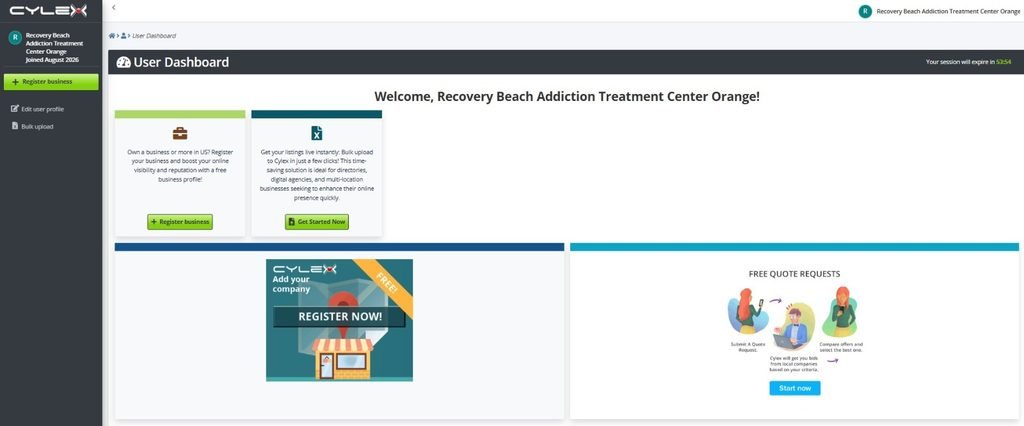
Once inside your account, click the “Add your business” button. Start by entering your zip code. A field for your business name will appear next. Begin typing and check if your business already exists in the system. If it does not appear, select the option to create a new business page using the name you entered.
Step 5: Enter your website and contact details
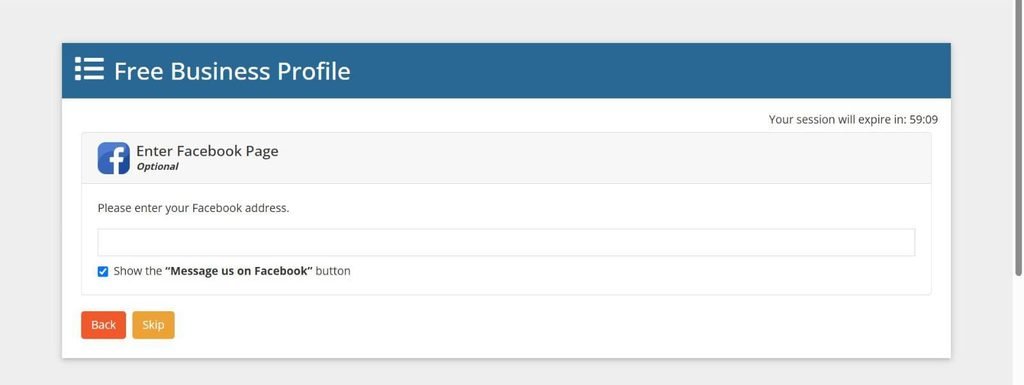
Add your website URL and phone number. You can also connect your Facebook page at this stage. These fields are optional but recommended. More complete listings perform better in search results.
Step 6: Set your address preferences
Enter your full business address. You will then choose to either display your address publicly on the listing or hide it. Both options still require you to enter the full address for location accuracy. If you are a service area business that does not want to show a physical location, select the hide option.
Step 7: Confirm your map pin
Cylex will generate location coordinates automatically based on your address. Check that the map pin is placed correctly. If it is off, drag the pin to the right location before continuing.
Step 8: Select your business categories
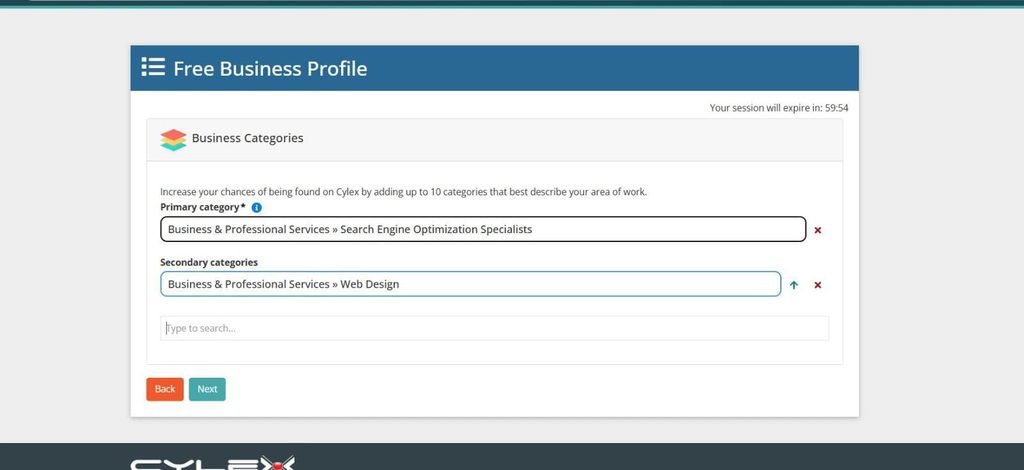
Add your primary category first, then add secondary categories that reflect other services you offer. You can add up to 5 categories. Choose only categories that genuinely apply to your business.
Step 9: Add keywords
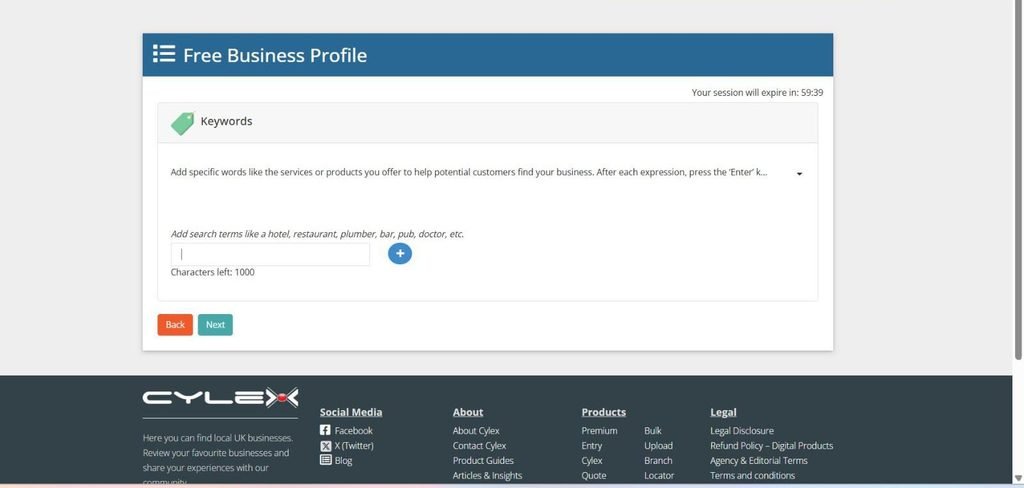
Enter keywords that describe your services or products, separated by commas. Think about the specific terms your customers would use to search for what you do. This field is mandatory.
Step 10: Add service areas and languages
If your business serves customers beyond your immediate location, add your service areas here. You can also note any languages spoken, which is useful for businesses serving multilingual communities.
Step 11: Write your business description
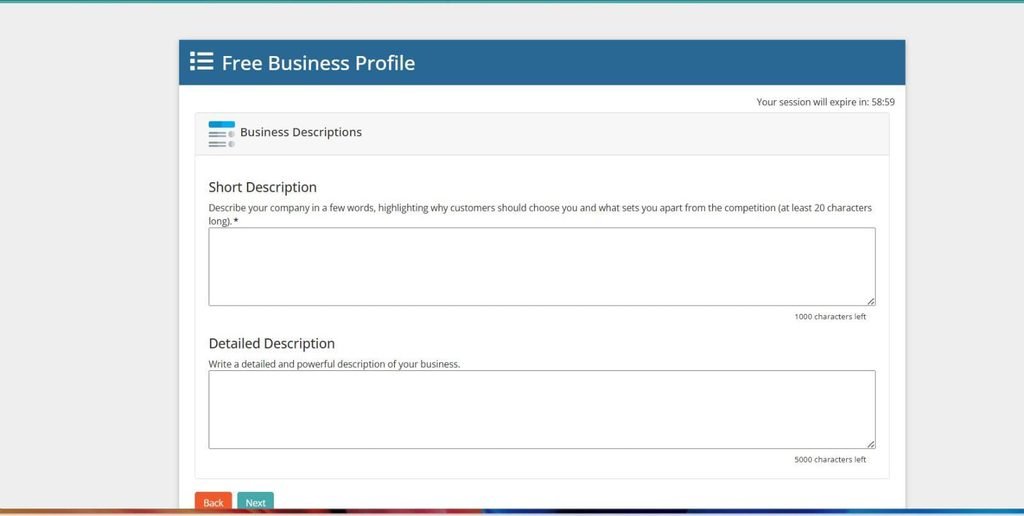
Add a short description and a longer description of your business. The short description is mandatory. Use clear, specific language. Describe what you do, who you serve, and what makes your business useful to customers.
Step 12: Set your opening hours
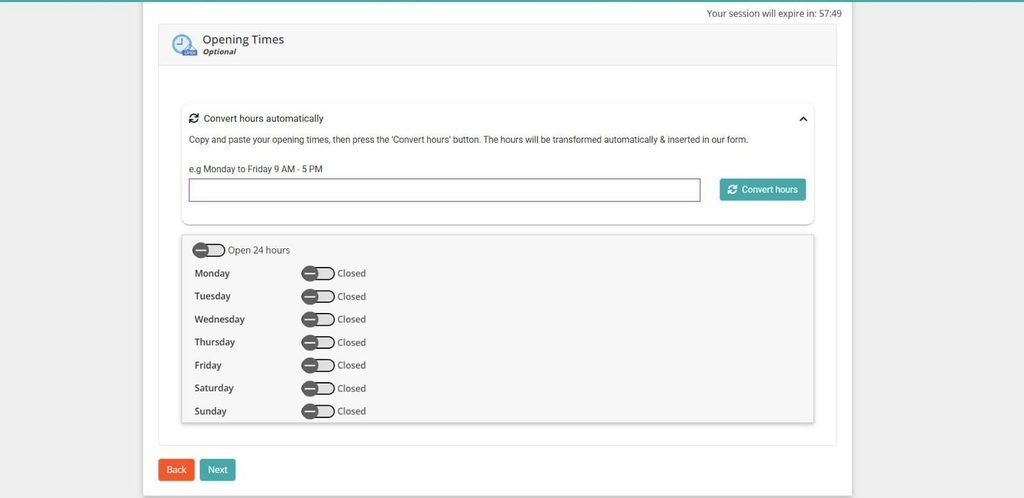
Enter your regular business hours. Include any special hours for holidays or seasonal changes if relevant.
Step 13: Create your profile
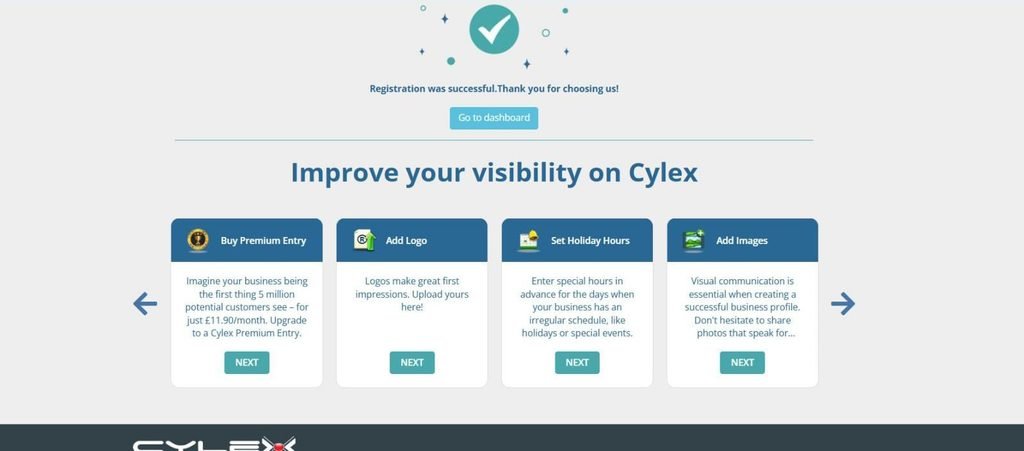
Agree to the terms and conditions and click “Create Profile.” Your listing is now live. Click “Go to Dashboard” to access the full account panel where you can continue adding content like photos, videos, and promotional offers.
How to Claim an Existing Cylex Listing
Many businesses already have a listing on Cylex without knowing it. The platform automatically generates basic profiles using publicly available business data. If your business has been operating for some time, there is a good chance a listing already exists with your name, address, and phone number on it.
The problem is that auto-generated listings are often incomplete or contain outdated information. Claiming it gives you full control to correct errors, add missing details, and optimize the profile properly.
Here is how to claim an existing listing.
Step 1: Search for your business on Cylex
Go to cylex.us.com or your regional equivalent. Enter your business name along with your city and state in the search fields. Click Search.
Step 2: Find your listing in the results
Look through the results for your business. If a listing appears, click on your business name to open the profile page.
Step 3: Report incorrect data to start the claim
On your business profile page, look for the option that says “Report Incorrect Data.” Click on it. This is the entry point for the claiming process.
Step 4: Select “Claim This Business”
From the options that appear, select “Claim This Business.” Cylex will then ask you to verify that you are the rightful owner of the listing.
Step 5: Choose your verification method
Cylex gives you a few options to verify ownership: by company email, by website, or by an alternative email address. Fill in the alternative email option and click “Send Email” to proceed.
Step 6: Confirm email access
When prompted to confirm you can access the email account, click “Yes.” Cylex will send a message to that address confirming your claim submission has been received.
Note that receiving this email does not mean the claim has been approved yet. It only confirms that your submission is under review.
Step 7: Wait for approval and access your admin link
Once Cylex approves your claim, they will send a confirmation message containing an Admin Link. Click that link to access the listing management panel for your business.
Step 8: Add your account details and activate management access
Fill in the required details on the admin page. Check the boxes to confirm you agree to the terms and conditions, then click “Add User.” You will receive a final confirmation email verifying that you can now fully manage the listing.
How to Optimize Your Cylex Profile for More Visibility
Creating the listing is step one. Optimizing it is what actually drives results.
Most businesses stop after filling in the basics. That leaves a lot of visibility on the table. A complete, well-optimized Cylex profile ranks better inside the directory, gets indexed more effectively by Google, and converts more profile visitors into actual customers.
Here is how to do it right.
Write a Strong Business Description
Your business description is the most important text field on your profile. It is what customers read to decide if your business fits their needs, and it is what search engines use to understand what you do.
Avoid generic statements like “we provide quality service” or “we are a trusted local business.” These tell the reader nothing useful.
Instead, be specific. Answer these three questions in your description:
- What exactly do you do?
- Who do you serve?
- What makes your business worth choosing?
Use your primary service keywords naturally throughout the text. Do not stuff them. Write for the reader first, and the keywords will fit in on their own.
Keep your sentences short and your paragraphs tight. A description that is easy to read holds attention longer and gives the reader more confidence in your business.
Choose the Right Categories and Keywords
Categories determine where your listing appears inside the Cylex directory. Choosing the wrong ones means showing up in searches that do not match your business, which leads to poor engagement and potentially negative reviews from mismatched visitors.
Start with your primary category. This should reflect your core service or business type as clearly as possible. Then add up to four secondary categories that represent additional services you genuinely offer.
For the keyword field, think like your customer. What exact phrases would they type to find a business like yours? Add those as your keywords, separated by commas. Include service-specific terms, location-relevant phrases, and any specializations that set you apart.
Avoid adding categories or keywords just to appear in more searches. Relevance always outperforms volume when it comes to directory traffic quality.
Keep Your NAP Consistent
Your business name, address, and phone number on Cylex must match exactly what appears on your website, Google Business Profile, and every other directory where your business is listed.
This means:
- If your business name includes “LLC,” include it everywhere
- If your address uses “Street” not “St.,” use “Street” everywhere
- Use the same phone number format across all platforms
- Use the same website URL, with or without “www,” consistently
Even small differences confuse search engines and weaken your citation profile. Before publishing your Cylex listing, cross-check your NAP details against your Google Business Profile and your website contact page. They should be identical.
Add High-Quality Photos
Listings with photos consistently get more clicks than those without. Photos make your profile feel real and build trust before a customer even reads your description.
Upload images that show:
- Your storefront or office exterior
- Your interior or work environment
- Your products, services, or completed projects
- Your team members
Avoid stock photos. Authentic images from your actual business location carry more credibility and give customers a clearer picture of what to expect.
For best results, use clear, well-lit images. Blurry or dark photos can make a strong business look unprofessional.
Get Reviews and Respond to Them
Customer reviews on your Cylex profile do two things. They influence buying decisions, and they signal to search engines that your listing is active and trusted.
The simplest way to get reviews is to ask. After completing a job or transaction, follow up with satisfied customers and include a direct link to your Cylex profile. Most customers are willing to leave a review when the process is made easy for them.
When reviews come in, respond to all of them.
For positive reviews, thank the customer and keep it brief. For negative reviews, respond professionally. Acknowledge the concern, avoid being defensive, and offer to resolve the issue offline. Future customers reading your responses will judge how you handle feedback as much as they judge the reviews themselves.
An active review profile also signals to Cylex’s algorithm that your listing is engaged, which can improve your placement within the directory.
Common Mistakes to Avoid
Most businesses that get little value from their Cylex listing are not doing anything dramatically wrong. They are making small, avoidable mistakes that quietly limit how well the listing performs.
Here are the most common ones to watch out for.
Leaving the Profile Incomplete
Creating a listing and stopping halfway is one of the most damaging things you can do for your local SEO. An incomplete profile ranks lower inside the Cylex directory, gets crawled less effectively by Google, and gives visitors less reason to trust your business.
Every empty field is a missed opportunity. Missing photos, no business description, no opening hours, no keywords: these gaps signal either an inactive business or one that does not pay attention to its online presence.
Fill out every section before you consider the listing done. The extra 15 minutes it takes to complete the profile fully will deliver far more value than a half-finished one ever will.
Inconsistent NAP Data
This one hurts local SEO more than most business owners realize. If your business name, address, or phone number on Cylex does not match exactly what appears on your website and Google Business Profile, you are sending conflicting signals to search engines.
Google cross-references your business information across multiple sources. When the data does not line up, it loses confidence in your listing and that can pull down your rankings in local search results.
Fix this before anything else. Create a reference document with your exact business name, address, phone number, and website URL formatted precisely as they should appear everywhere online. Use that document every time you update or create a directory listing.
Ignoring Customer Reviews
A listing with no reviews, or one where reviews go unanswered, looks abandoned. It also wastes one of the most powerful trust signals available to local businesses.
Reviews influence buying decisions directly. When a potential customer compares two similar businesses and one has active, responded-to reviews while the other has none, the choice is easy.
Make it a habit to ask satisfied customers to leave a review after a job is completed. And when reviews come in, respond to them. Every response, positive or negative, shows future visitors that your business is attentive and professional.
Never Updating the Listing After It Goes Live
Business information changes. Hours shift. Phone numbers update. Services expand or change. A listing that was accurate six months ago may now be sending customers to a disconnected number or showing hours that no longer apply.
Outdated listings create bad customer experiences and damage trust. Set a reminder to review your Cylex profile every quarter. Update it immediately any time your business details change rather than letting inaccurate information sit there and cause problems.
Final Thoughts
The Cylex business directory is not a magic solution for local SEO. No single directory is.
But it is a reliable, free, and well-established citation source that has been operating for nearly three decades across 32 countries. When your listing is complete, accurate, and optimized, it adds a meaningful signal to your overall local search presence.
FAQs
Yes. Cylex offers a free listing that includes your core business information, a description, photos, opening hours, a website link, and customer reviews. There is no cost to create or maintain a basic profile. A paid premium entry is available for businesses that want priority placement and additional features, but the free listing is enough to start building citation value for local SEO.
A new listing typically goes live within 24 to 48 hours after your email is verified and your profile is submitted. Claimed listings that require approval from the Cylex team can take a few days longer. Measurable SEO impact from the listing usually takes 4 to 8 weeks as search engines crawl, index, and factor the citation into local ranking signals.
Yes, but it works as part of a broader citation strategy rather than as a standalone fix. A complete and accurate Cylex listing contributes to your NAP consistency across the web, provides a backlink to your website, and adds a trusted third-party citation that Google uses as a local ranking signal. Cylex also syncs its data across 91 partner directories, which extends the citation value beyond the platform itself.
You can submit a removal request by contacting Cylex support directly through their website. Auto-generated listings can typically be removed or suppressed once you claim the profile and request deletion. Keep in mind that removing a listing from a reputable directory can weaken your citation profile, so it is worth considering the local SEO impact before removing it unless the listing contains information you cannot correct.
Yes. Each physical business location should have its own dedicated listing with that location’s specific address, phone number, and relevant local details. For businesses operating in multiple countries, create separate listings on the appropriate regional Cylex platform for each market, such as cylex-uk.co.uk for the UK or cylex-australia.com for Australia.
They serve different purposes. Google Business Profile is essential for map pack visibility and should always be your first priority. Cylex works alongside it as an additional citation source and discovery channel. Using both together strengthens your overall local SEO by creating consistent NAP signals across multiple trusted platforms, which gives Google more confidence in your business data and improves your chances of ranking well in local search results.
About the Author
I’m Shasi, the Founder of Citation Forge, with 10+ years of experience in Local SEO, local citation building, and overall, SEO. I’m passionate about helping businesses improve their online visibility, Google Business Profile rankings, and local search presence through effective SEO and citation strategies. Over the years, I’ve worked with businesses and agencies worldwide, helping them build stronger online authority and long-term organic growth. I also enjoy writing about SEO, Local SEO, local citations, link-building, and digital marketing to share practical insights, strategies, and industry updates that help businesses grow online more effectively.